Jade is “a high performance template engine heavily influenced by Haml and implemented with JavaScript for node”.
One of it’s nice features is that it lets you compile your Jade templates into JavaScript functions which can be ran client-side. This is particularly useful when you want to pass JSON data back from an AJAX call and render it; it keeps you have from having to pass HTML “over the wire” or from writing complex JavaScript to rebuild your DOM elements. It’s also super fast.
After installing Jade, you can compile a single template via the command-line by running jade -c template.jade. This will generate a *.js file that looks like this:
function anonymous(locals, attrs, escape, rethrow, merge) {
...
}
Which is great, except that it’s just about unusable as-is. If you try including that to your page, you now have access to a single function called “anonymous” — not very helpful. The problem gets worse if you want to have access to more than one template.
Wouldn’t it be nicer if all of your templates got compiled to a single object with a sensible name, which you could use the access all your template functions? That’s why I wrote a script to compile all your Jade files into a single .js file that looks like this:
var Templates = {
"login":
function anonymous(locals, attrs, escape, rethrow, merge) {
..
},
"change_password":
function anonymous(locals, attrs, escape, rethrow, merge) {
..
}
};
Now you just need to include that Jade runtime plus this file that got generated via:
<script type="text/javascript" src="/js/jade/runtime.js"></script>
<script type="text/javascript" src="/js/templates.js"></script>
You can find runtime.js inside node_modules/jade after you install it.
Here’s the script:
var Jade = require('jade');
var FileSystem = require('fs');
var Path = require('path');
var _ = require('underscore');
var outName = 'public/js/templates.js';
var viewsDir = 'views';
files = FileSystem.readdirSync(viewsDir);
var templates = {};
files.forEach(function(filename) {
if(/\.jade$/.test(filename)) {
var name = Path.basename(filename, '.jade');
var path = Path.join(viewsDir, filename);
console.log('compiling', path);
var fileContents = FileSystem.readFileSync(path, {encoding: 'utf8'});
templates[name] = Jade.compile(fileContents, {
debug: false,
compileDebug: true,
filename: path,
client: true
});
}
});
console.log('writing', outName);
var properties = [];
_.each(templates, function(value, key) {
properties.push(JSON.stringify(key) + ':\n ' + value.toString());
});
var sourceCode = 'var Templates = {\n' + properties.join(',\n\n') + '\n};';
FileSystem.writeFile(outName, sourceCode);
I called mine “compile_jade.js”. You run it via “node compile_jade.js”. You will probably need to adjust your paths as necessary (see “outName” and “viewsDir” near the top). I will probably expand on this script in the future, but this should be enough to get you started with client-side Jade!
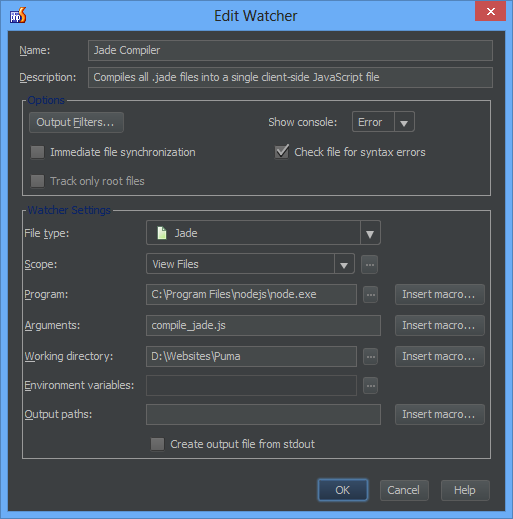
If you’re using PhpStorm or WebStorm like me, you can set up a File Watcher to watch your Jade files have it automatically re-run this script whenever you edit one of them: